By Tom HavyarimanaJune 29, 2026
Context Engineering 101: What to Keep Out of Your AI's Head
Most people discover context engineering through pain: the bill is higher than expected, the model gets slower, the answer gets worse halfway through a long chat, or an agent confidently works from stale assumptions.
At first, that looks like a token problem.
It is, partly. Tokens are the meter. They are how these systems count input, output, tool results, cached content, and sometimes reasoning. Spending fewer of them is a real goal, and token optimization is a real skill. But it is the symptom you notice, not the disease. The deeper problem is usually not that the model is using too many words. It is that the wrong information is being carried into the model at the wrong time.
Token optimization asks: how do we spend fewer tokens?
Context engineering asks a bigger question that contains the first one: what should the model know right now?
Context engineering is the discipline of assembling the model's working set: the information, tools, memory, state, examples, and output format it needs for the next decision.
Get that right and you usually spend fewer tokens anyway. Cost drops, latency drops, cache hits improve, the agent stays focused. But not always, and that is the point. Sometimes the right move is to spend more tokens, because the extra context prevents mistakes, reduces follow-up turns, or gives the model enough to make a better decision.
So this is not an argument against saving tokens. It is an argument against optimizing the wrong thing.
The goal is not a shorter answer.
The goal is a better working set.
And the deepest move is not deciding what to put in front of the model. It is deciding what to keep out. As the work grows, the context you keep out of the way matters more than the context you add. That is the thread running through everything below.
TL;DR
- Token optimization is about spending fewer tokens. Context engineering is about giving the model the right working set for the next decision.
- Most of the work is subtraction: deciding what to keep out of the context, not what to put in.
- Shorter output is not automatically cheaper. If the answer gets too compressed and creates follow-up questions, total work can go up.
- Most waste comes from stale, duplicated, noisy, conflicting, unsafe, or machine-generated context entering the model.
- At scale you protect the main session: isolate noisy work into specialists and offload durable knowledge to files, so the main thread stays clean and keeps working for longer.
- Power users and engineers get leverage from filtered CLIs, scoped tools, intentional compaction, narrow retrieval, model routing, and bounded subagents that keep the main session clean.
The Pain
If you work with coding agents for long enough, you run into the same question again and again: how do I make sessions run longer while keeping the quality stable?
My own setup was already useful. I had assembled a working enterprise agentic system: specialized agents with defined roles, a tiered memory architecture with separate layers for shared team knowledge, per-project context, and session-specific state, and a plugin layer that let those agents coordinate across workflows. Agents shipped CI/CD pipelines, managed project knowledge, and handed off structured summaries across sessions.
To keep improving that setup, and to make sessions run longer while keeping quality high and stable, I spend time almost every day scouting new tools, skills, and trending repos.
New agent tools show up constantly, and many of them are interesting. The real question is whether they make the cut: do they improve the system enough to become part of the way I work?
Two experiments made that distinction clear. The first was RTK, a CLI proxy that filters and compresses command output before it reaches the model context. The second was Caveman, a Matt Pocock skill I used for terser final responses.
The test was simple: does this help me run longer sessions without lowering quality?
In this blog repo, with dependencies installed, a raw file discovery command produced a ridiculous amount of context:
find . -type f: 44,160 lines and 3,092,214 bytesrtk find . -type f: 18 lines and 992 bytes
That is a 99.97 percent reduction by bytes for that command. The exact token estimate is rough, but the shape of the problem is not. Most of the raw output was not useful context. It was machine noise.
Reproducibility note: these numbers came from this repository with dependencies installed. To compare another checkout, run both commands from the same root and capture the line and byte counts from stdout. Totals will vary with dependency state and RTK version, so treat this as a repository-specific measurement, not a general benchmark.
RTK made the cut because it improved the boundary of the system. It shaped context before the model had to read it, which protected the main session from low-value machine output.
The Caveman experiment felt different. Shortening the final answer did reduce visible output, but output tokens were not the main source of waste in that workflow. More importantly, it did not protect the working context. It often removed useful explanation, so I found myself asking follow-up questions just to understand what the agent meant.
The answer got shorter. The work did not get cheaper.
That is the first lesson of context engineering: do not optimize the part of the system just because it is visible. Optimize the part that actually helps the session stay useful for longer.
What Context Engineering Actually Means
The public conversation around context engineering has mostly converged on a simple idea: good AI systems give the model the right information, the right tools, the right format, and the right timing.
That phrasing shows up across practitioner writing from LangChain, Simon Willison, Sourcegraph, Anthropic, and others. The exact taxonomy changes. LangChain organizes the work as writing, selecting, compressing, and isolating context. Anthropic's cookbook separates memory, compaction, and tool-result clearing. Drew Breunig catalogs the ways context fails. The operations are familiar by now, and largely shared: select what belongs, shape it into a usable form, store what should live outside the window, isolate noisy work elsewhere, and clear what no longer helps.
I am not going to dress those up as a new framework. They are the public vocabulary, and they are good.
What I want to add is where the leverage actually sits. You can spend all your effort choosing what to put in front of the model and still lose, because the harder discipline is the opposite one: deciding what to keep out. Context engineering is not only about adding context. It is mostly about deciding what should not be in the room, and then building the machinery to keep it out. The rest of this article is about that machinery.
What Counts As Context
Most people think context means "the prompt."
That is too narrow.
In a real AI workflow, context includes more than text you paste:
- your current message
- prior turns in the conversation
- system and developer instructions
- files, docs, screenshots, transcripts, and pasted text
- retrieved memory or knowledge
- tool names, tool descriptions, tool calls, and tool results
- API responses, CLI output, and MCP resources
- repository state, browser state, issues, traces, and test output
- summaries from subagents
- output format, schemas, headings, tables, and examples
- hidden reasoning or thinking budget, depending on the provider and model
Context is everything the model has to read, account for, or work around.
That means context engineering is not only a prompt-writing skill. It is a workflow design skill: what enters the model, what stays outside, what gets summarized, what gets retrieved later, and what gets forgotten.
This is where context engineering parts ways with prompt engineering. Prompt engineering tunes the wording of a single instruction. Context engineering decides the whole working set the list above describes, the instruction included but far from alone: files, tool results, memory, history, and format. When people say the field moved from prompt engineering to context engineering, that is the shift they mean. Not writing a better message, but managing everything in the window.
The more agentic your workflow becomes, the more important this gets.
A simple chat has user messages and assistant replies. A coding agent has repository files, command outputs, test failures, logs, Git diffs, instructions, tool schemas, browser screenshots, MCP resources, task plans, and sometimes multiple subagents all producing their own summaries.
If you do not manage that context, the context manages you.
How Context Fails
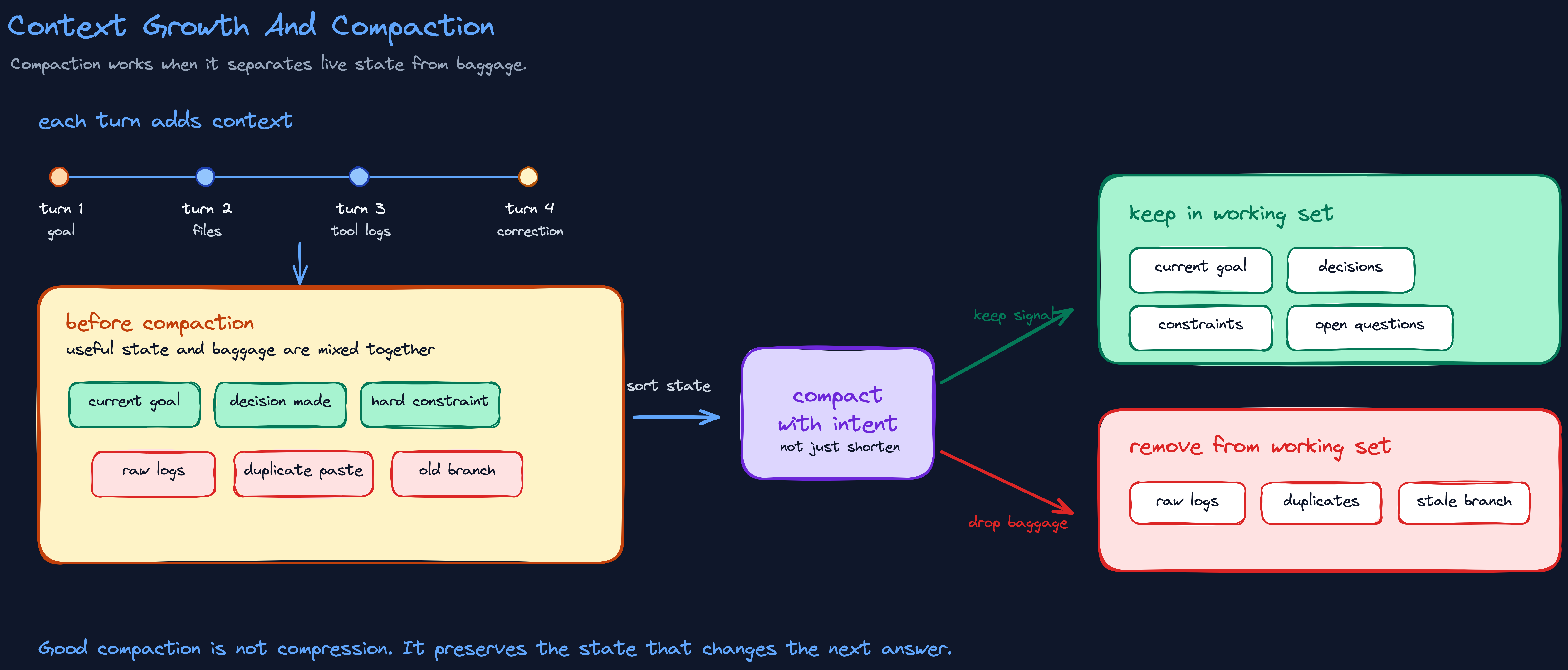
Context usually grows quietly.
You ask a question. The model answers. You clarify. You paste a document. It summarizes. You ask for a rewrite. You correct a detail.
By turn ten, the model is carrying more than your latest request. It is carrying earlier assumptions, corrections, and artifacts too.
For everyday users, this is why long chats start to feel strange. The model may keep honoring an old constraint after it stops mattering. It may mix two tasks together. It may write based on a stale draft because the current goal is buried under earlier turns.
For agent users, the problem gets louder. Tool-heavy sessions add logs, search results, stack traces, file reads, command output, and intermediate plans. MCP servers expose tools and resources. CLIs dump thousands of lines. API calls return huge JSON payloads. Subagents isolate work, but can also duplicate setup and coordination context.
There are several failure modes hiding inside the phrase "too much context":
- stale context: old information that pulls the model toward the wrong task
- duplicate context: repeated information that gets overweighted or reconciled badly
- noisy context: logs, giant file lists, irrelevant search results, long traces, and unrelated files
- conflicting context: instructions, examples, or retrieved facts that disagree
- unsafe context: web pages, user text, client docs, retrieved snippets, and tool output treated as if they were trusted instructions
- rotten context: context that looks useful but degrades behavior as it grows
These overlap with Drew Breunig's widely cited failure taxonomy: poisoning, when an error enters the context and gets referenced again and again; distraction, when a long history crowds out the model's own training; confusion, when irrelevant content drags the answer down; and clash, when newly added context contradicts what was already there. His names are good. I keep my own list because it sorts failures by what you do about them rather than by how they show up: you clear stale and duplicate context, you shape noisy context, you label unsafe context, you reconcile conflicting context.
Chroma's context rot research is useful because it moves beyond the old idea that long context only fails when relevant information is buried in the middle. Long-context behavior can degrade in uneven ways as input length, distractors, similarity, and structure change.
The older Lost in the Middle paper is still worth remembering too. Models have improved since it came out, but the lesson survives: a bigger context window does not guarantee the model will use the right piece of context at the right moment.
Long context is powerful.
Long context is not automatically good context.
The Context Budget
The simplest mental model is a context budget.
Before asking an AI system to do serious work, ask:
- What decision does the model need to make?
- What facts, constraints, examples, tools, and files are required for that decision?
- What context is stale, duplicated, noisy, conflicting, or untrusted?
- What can be summarized, cached, retrieved later, stored in a file, or handled outside the model?
- What should stay in the human-facing answer even if it costs more tokens?
That last question matters.
A lot of bad token optimization happens because people remove explanation from the part the human actually needs. A short answer can be expensive if it creates confusion. A longer answer can be cheap if it prevents three more turns.
So the target is not minimal context.
The target is sufficient context.
You want the model to see enough to make the right decision, and not so much that it has to search through irrelevant material.
This is why long context windows do not make context engineering obsolete. Bigger windows are useful. Cheaper tokens are useful. But a bigger desk does not organize your work for you. It only lets you pile more things onto the desk.
The Context Pipeline
Once you treat context as a working set instead of a prompt, it has a lifecycle. Each turn:
- Collect the candidates: the request, recent turns, files, memory, retrieved docs, tool output, API data, screenshots, examples.
- Assemble the smallest set the next decision needs, separate instructions from data, and put stable context where caching can reuse it.
- Push bulky work outside the model. Let code count, sort, filter, parse, and extract instead of asking the model to read raw piles.
- Observe what happened: cost, latency, cache hits, tool-call count, retries, answer quality, follow-up turns.
- Store the durable decisions, clear the stale and the raw, and compact if the task continues.
The important part is that the loop runs when the task changes. A context pipeline is not something you set once in a system prompt and forget. It is the ongoing habit of deciding what the model should know now.
Format Is Context
Format is not decoration. Format changes what the model can do with the information.
Five relevant fields beat a giant JSON blob.
A short table beats a paragraph when the task is comparison.
A file path can beat pasted file contents when the tool can read that file later.
A structured error summary can beat a full stack trace when the stack trace is only evidence of the failure class. But the full trace may be necessary when the exact line or frame is the evidence.
Tool names and parameters are context too. A tool called delete_project carries a different affordance than a generic run_action tool with a hidden operation. Schema names, field names, labels, delimiters, and examples all shape the model's behavior.
This is why context engineering often feels like data plumbing. The work is deciding whether the model sees a 900-line response, a five-row table, a file path, or a one-sentence summary with a link back to the source.
That decision is the work.
From Habit To Operation
You can practice this at any level. In a normal chat the moves are small: start a fresh thread when the task changes so old assumptions stop leaking in, ask for a summary of decisions and open questions before you switch topics, name the output shape you want, and say which source is authoritative when several disagree. The rule is the one the rest of this article expands: do not starve the model, and do not bury it. Feed it deliberately.
The leverage grows once you work with coding agents and automation, where context stops being something you type and becomes something you operate.
The first lever is the interface. If a command can return 40,000 lines, do not blindly put those 40,000 lines in the model context. Count, filter, search, group, or summarize first. CLI wrappers such as RTK are useful because they prevent large, low-value output from becoming model input.
The same principle applies to project instructions. Always-loaded instruction files are useful for stable project rules, but bad for every specialized workflow you might someday need. If instructions only matter for one kind of task, move them into an on-demand skill, runbook, or reference file.
Compaction is another lever. A good compaction preserves the goal, constraints, decisions, current files, unresolved questions, and next step. A bad compaction drops the subtle details that made the work correct.
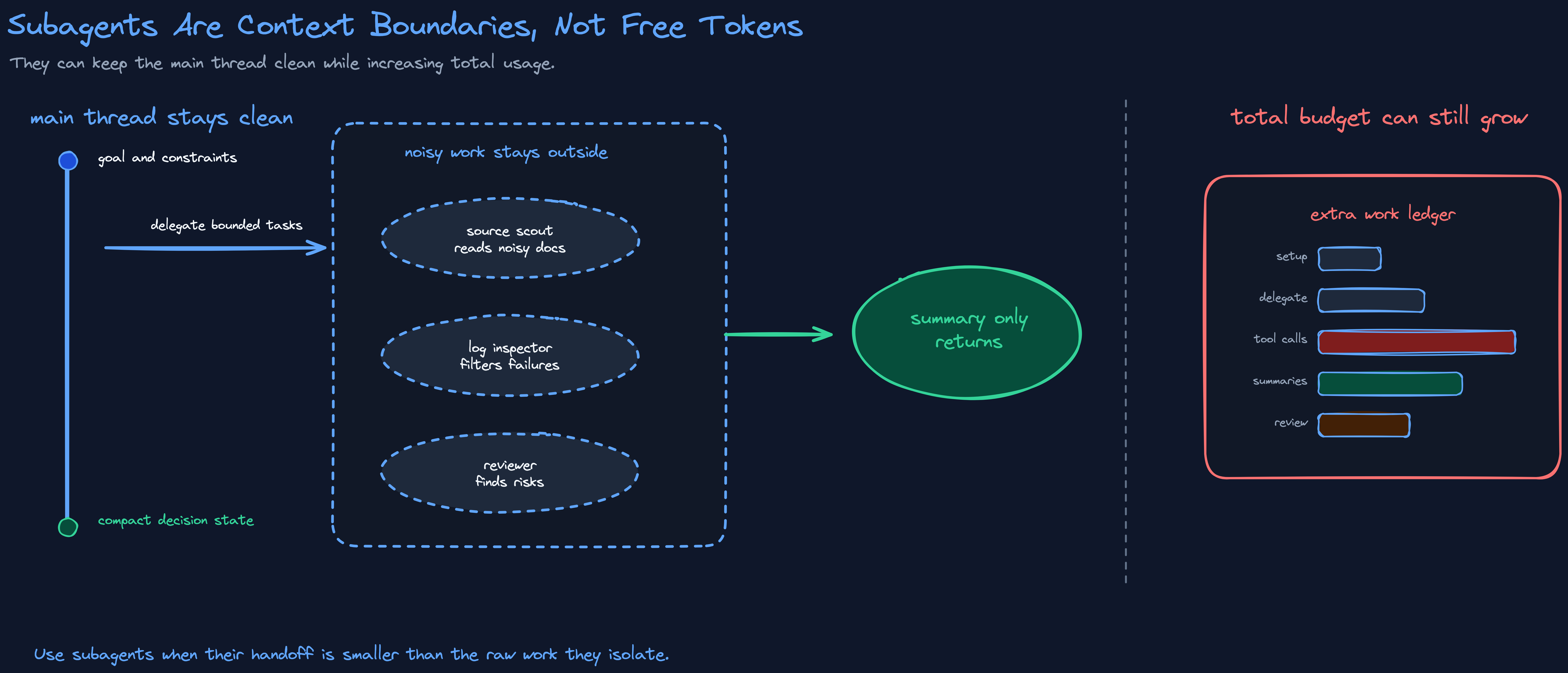
Subagents are a context boundary, not a free lunch. They can keep noisy work out of the main thread, but each one may need setup context, task instructions, tool calls, summaries, and review. Anthropic's Claude Code cost docs warn that agentic workflows can use more total token budget than a standard chat. Subagents optimize context only when they are scoped tightly and return a useful handoff.
For power users, the practical advice is:
- prefer CLIs when they let you filter output before the model sees it
- use RTK-style wrappers for noisy commands
- disable unused MCP servers and tools
- keep always-loaded project instructions short
- move specialized behavior into on-demand skills or runbooks
- compact intentionally, with instructions about what to preserve
- use subagents for bounded, noisy work that can return a compact summary
- clear raw tool output once the important result has been captured
API, CLI, And MCP As Context Surfaces
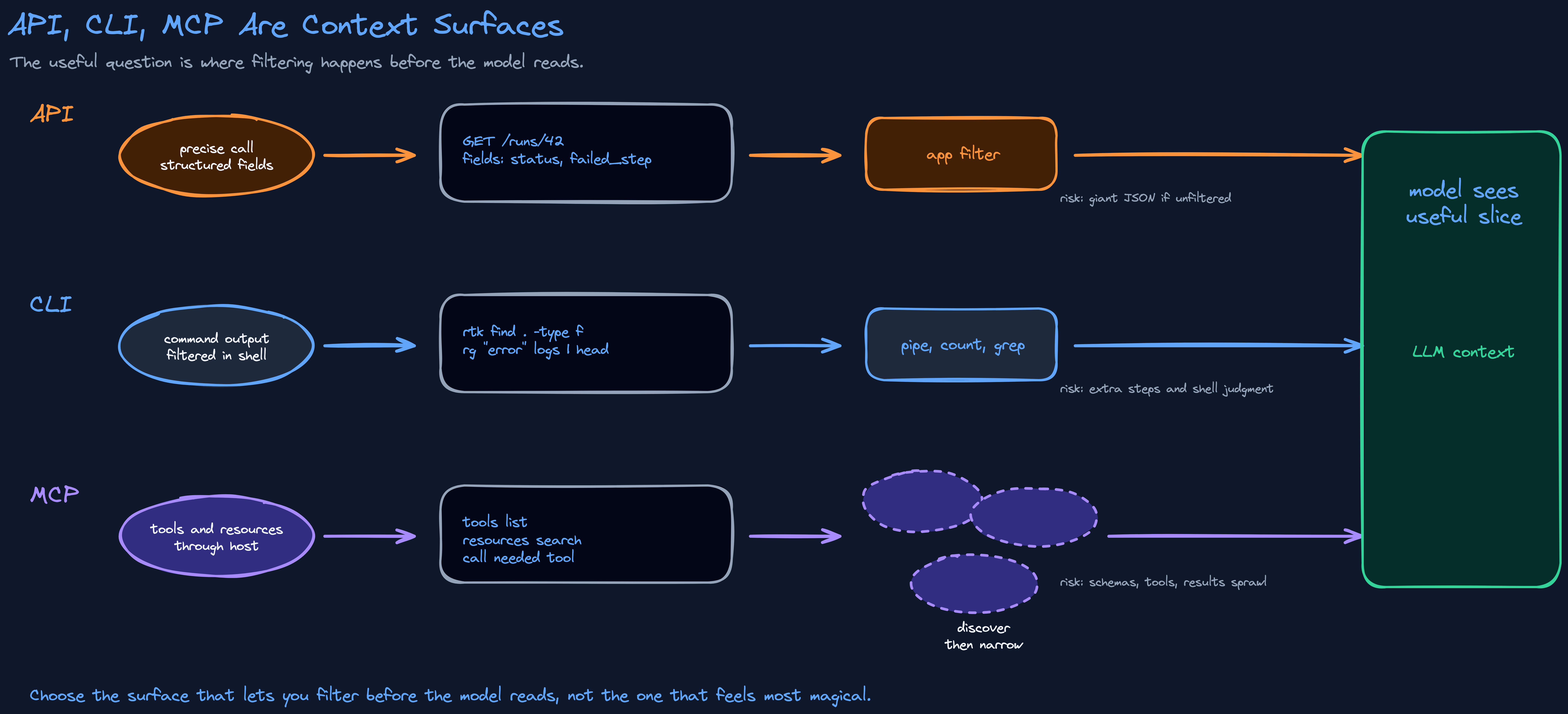
A useful way to think about API, CLI, and MCP is not "which one is best?" It is: which one gives the model the smallest useful view of the state?
| Surface | Good when | The catch |
|---|---|---|
| API | The call is narrow and the response is transformed before it reaches the model: one normalized record with five relevant fields. | A raw JSON payload dumped into the prompt is not context engineering. |
| CLI | You can filter before ingestion: search, count, group, show only failures, or summarize a diff. | Command knowledge, safety judgment, and extra steps. |
| MCP | You need discoverable tools, authenticated services, app resources, and cross-app workflows. | Convenience can hide context cost. Too many tools, schemas, resources, or noisy results make the model work harder than necessary. |
The current Claude Code docs say MCP tool definitions are deferred by default, so only tool names enter context until a specific tool is used. That is a good design choice. It also proves the broader point: MCP clients need to be context-aware. Anthropic's engineering posts on code execution with MCP and advanced tool use make the same basic tradeoff visible: load fewer tools upfront, process bulky data outside the model, and give the model only the relevant slice.
The common rule is the same: filter before the model reads.
Builder Patterns
For people building agent systems, context engineering becomes architecture.
Retrieve selectively. A memory system that returns everything is just a larger prompt. Retrieval should return the smallest useful set of facts for the current task.
Separate memory, compaction, tool clearing, and files. They solve different problems.
| Technique | Use when | Risk |
|---|---|---|
| Memory | A fact or decision will matter across turns or sessions. | Bad retrieval returns stale or irrelevant facts. |
| Compaction | The current thread is too long but the task continues. | Lossy summaries drop subtle constraints. |
| Tool clearing | A tool result was useful once but should not keep occupying context. | Removing evidence too aggressively can hide the cause of a failure. |
| Filesystem notes | State is large, evolving, or restorable by path. | The model must know when and how to read it back. |
Put stable context first when using prompt caching. OpenAI's prompt caching docs recommend keeping static content in a stable prefix so cache hits are easier to reuse. Caching rewards stable context design.
The Manus team, writing from the experience of shipping an agent to a large user base, takes this further and treats the KV-cache hit rate as the single most important production metric, because cached input tokens can cost an order of magnitude less than uncached ones. Their rules all follow from keeping that cache intact: hold a stable prefix, append rather than rewrite, and when a tool should be unavailable, mask it at the decoding step instead of deleting its definition and invalidating everything cached after it. Their lens is cost and mine is keeping the main session clean, but the design lesson points the same way: stable, well-bounded context is also cheap context.
Filter tool results before the model sees them. Logs, search results, API payloads, database rows, test output, browser traces, and MCP responses should be counted, sorted, grouped, deduplicated, or field-extracted by code where possible.
Route models by task. Classification, formatting, extraction, and simple rewrites can often use cheaper or faster models. Hard reasoning, ambiguous tradeoffs, and high-stakes writing need more capable models.
Use code execution for large data. Let the agent process large results in the execution environment and return only the relevant context.
Design subagents as context boundaries. A subagent should have a scoped question, bounded inputs, and a compact output. If it needs the entire main thread to do its job, it may not be reducing context complexity.
I learned how much this matters by building it. The system I mentioned at the start is an organization of specialized agents: twenty-six of them, each with a defined role that maps to a real company function, an architect, a principal engineer, a QA lead, a security auditor, a DevOps lead, a prompt engineer, a legal reviewer, even a strategy lead and a finance lead. An orchestrator dispatches work to them.
The reason that structure exists is not token savings, and it took me a while to say that plainly. It exists for context isolation and offloading. Each specialist reasons in its own window, so the noisy middle of its work never lands in my main session. The main session stays clean, which means it stays useful for longer, and its job becomes deciding what to dispatch rather than holding every detail itself. A bigger context window would let the main session absorb all of that work directly. It would also rot faster. Isolation is a context decision before it is an architecture decision.
Those specialists share a tiered memory: separate layers for shared team canon, per-project knowledge, and session state. Its job is the other half of protecting the main session. Isolation keeps noisy work out; offloading keeps durable knowledge out. The company's accumulated knowledge does not ride along in every session. It sits in files, and a task pulls in only the slice it needs. The main session holds the decision, not the whole brain behind it.
The memory is plain Markdown in version-controlled files rather than a vector database. The scaling argument favors vectors, and past a certain size they become necessary. I chose files for smaller reasons that still matter day to day: they are trivial to edit and diff, and when an agent acts on a stale fact, that fact has an address. I can open the file, read its history, and fix it. With an embedding match I would often know the behavior was wrong before I knew which chunk caused it. That is a real benefit, but it is a side effect of the design, not the reason for it. The reason is to keep the main session from carrying what it does not need right now.
Measure context decisions. You do not know whether context engineering worked until you inspect traces: input tokens, output tokens, cache hits, latency, tool-call count, retry count, answer quality, and follow-up turns. For production systems, add evals that test whether the agent still succeeds when retrieval returns distractors, tools produce noisy output, or memory contains stale facts.
Preserve trust boundaries. A system instruction, a developer instruction, a user message, a web page, a client file, a retrieved document, and a tool result should not all have equal authority. Good context engineering labels source, freshness, permission, and trust level. That is partly a quality issue and partly a security issue, because context is also where prompt injection and data leakage can enter the system.
There is an emerging version of this discipline that goes beyond shrinking context. The Agentic Context Engineering paper frames context as something an agent can evolve over time: playbooks, traces, strategies, examples, and memory that improve with feedback. That is the more interesting future: not smaller context for its own sake, but maintained context.
When Context Engineering Backfires
There is a bad version of this article.
It says: always use fewer tokens, always summarize, always compress, always use the cheapest model, always hide detail from the assistant.
That advice is wrong.
Tokens are getting cheaper. Context windows are getting larger. Output tokens can matter for latency. Some tasks genuinely need more context. Some compression loses nuance. Some optimization wastes more human time than it saves.
OpenAI's latency optimization docs make this nuance clear. Reducing output tokens can be a major latency lever, while reducing input tokens may have smaller latency impact unless the context is massive. That does not contradict the context-engineering argument. It sharpens it.
Sometimes the expensive part is the output. Sometimes it is the input. Sometimes it is the repeated clarification loop caused by removing too much useful detail.
The practical rule is:
Optimize context that is noisy, stale, duplicated, conflicting, unsafe, or machine-generated. Do not remove context the model needs to make the right decision.
Before You Blame The Model
Inspect the context first.
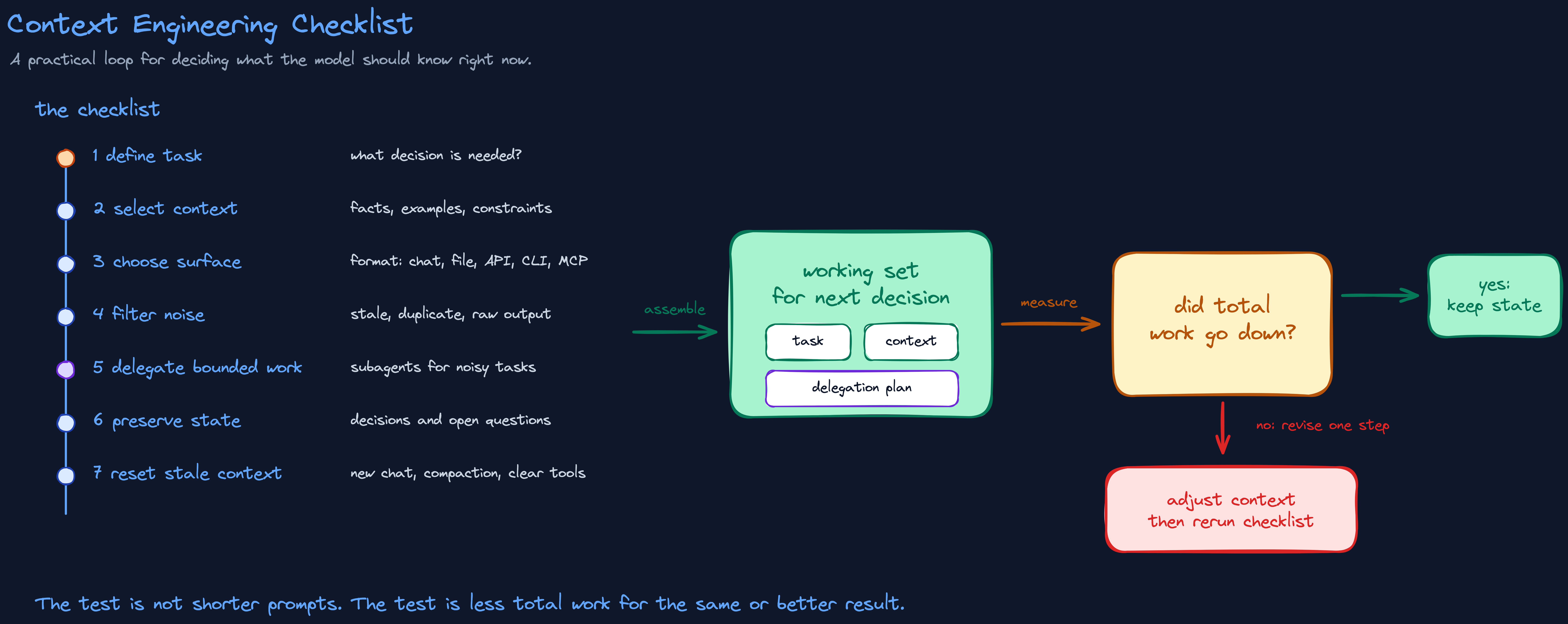
- What decision does the model need to make right now?
- What context is essential for that decision, and what is noise?
- What is stale, duplicated, conflicting, or untrusted in the current window?
- What surface and format would make the relevant information easiest to use?
- What can be cached, filtered, summarized, or handled by code instead of by the model?
- What should be stored outside the live window so the model can retrieve it later?
- Did total work go down, or did you just make the output shorter?
That last question is the one I keep coming back to.
Shorter is not always cheaper. More context is not always better. A bigger context window is not a substitute for judgment.
The best context engineering is almost invisible. The model gets the file it needs, the tool output is already filtered, the stale assumption is gone, the durable decision is stored somewhere retrievable, and the human answer keeps the explanation that actually matters. Most of that work is subtraction: deciding what never had to be in the room.
That is the standard: not less context, and not more context. The right working set for the next decision, and the discipline to keep everything else out.
Context engineering is the judgment that gets you there.